


Samsung Odyssey OLED G8 G81SF 32" 4K Gaming Monitor
- 32 in QD-OLED, 3840 x 2160
- 240Hz, 0.03 ms GtG
- DisplayHDR True Black 400, 1,000,000:1
- Glare Free, 54% less glossy than standard AR film
- Burn-in safeguards: pulsating heat pipe, logo and taskbar dimming
- 2 HDMI, DisplayPort, USB hub, 3 year warranty
Last refreshed Sep 23, 2026 · Based on the Amazon listing and published specifications, not hands-on testing.
A sharp Ultra HD QD-OLED gaming monitor with high refresh, deep blacks and several burn-in safeguards, plus a glare reducing coating. Logo dimming does not work in PC mode, so desktop users still need care.
As an Amazon Associate I earn from qualifying purchases. ProductDome earns a commission when you buy through links on this page.
ASIN: B0DY2YQ439Category: Computer Monitors
Sizes Available
Need a different one? Pick on Amazon →
Overview
Gamers who want Ultra HD sharpness and OLED speed together get a QD-OLED panel with a fast refresh rate and near zero response time. A pulsating heat pipe and brightness controls work in the background to reduce burn-in risk.
Ultra HD detail with OLED contrast and speed covers both single player showpieces and fast shooters on one screen. Some burn-in protections are limited in PC mode, which matters for static desktop work.
Who it's for
Enthusiast gamers with strong graphics cards get sharp, fast and contrast rich visuals. Spreadsheet and coding marathons with fixed layouts suit an IPS screen better.
Pros and cons
- Sharp Ultra HD OLED
- High refresh for its resolution
- Glare reducing coating
- Burn-in protection tools
- Logo detection off in PC mode
- Needs a strong GPU for high frame rates
- Burn-in risk with static content
Performance notes
Contrast and speed come from self-lit QD-OLED pixels, while the Glare Free coating cuts reflections without the haze of a heavy matte layer. Heat is pulled from the panel by a pulsating heat pipe, which slows the wear that leads to burn-in.
Specifications
| Brand | Samsung |
|---|---|
| Dimensions & fit | |
| Screen size | 32 incheshigher than 65% of 128 computer monitors |
| Item weight | 18.5 poundshigher than 64% of 88 computer monitors |
| Power & efficiency | |
| Power Consumption | 180 wattshigher than 98% of 62 computer monitors |
| Construction & materials | |
| Color Gamut | 99 |
| Warranty & support | |
| Warranty Description | 3 year manufacturer |
| Other details | |
| Native Resolution | 3840 x 2160 |
| Refresh Rate | 240 Hzhigher than 76% of 106 computer monitors |
| Response Time | 0.03 ms GtGlower than 81% of 101 computer monitors |
| Brightness | 260 cd/m2 |
| Display Technology | QD-OLED |
| Adaptive Sync | FreeSync (Pro tier), G-Sync Compatible |
| Contrast Ratio | 1,000,000:1 |
| HDR | VESA DisplayHDR True Black 400 |
| Ports | 2x HDMI, DisplayPort, USB |
| Stand | Ergonomic, tilt and height adjustable |
Closest rivals on specs
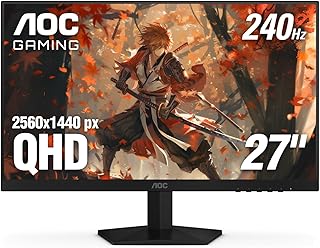 AOC Q27G41ZE QHD Gaming Monitor 27 Inch
- Response Time 0.03 vs 0.3 ms (-90%)
 MSI MAG 274QP QD-OLED 27" Gaming Monitor
- Item weight 18.5 vs 20.7 pounds (-11%)
 SANSUI ES-G27C1 PRO Curved Gaming Monitor 27 Inch
- Response Time 0.03 vs 1 ms (-97%)
Frequently asked questions
How do you set up the Samsung Odyssey G8 G81SF on a desk?
It comes on an ergonomic stand that tilts and adjusts. Connect by HDMI or DisplayPort, and use the stand to set height.
Does the Samsung G81SF protect against burn-in?
It uses a pulsating heat pipe, thermal modulation and logo and taskbar dimming. Logo detection is not available in PC mode.
Does the Odyssey G8 G81SF work with Nvidia cards?
Yes. It is G-Sync Compatible, and FreeSync works with AMD cards.
How glossy is the G81SF screen?
Samsung says Glare Free makes it 54% less glossy than conventional anti-reflection film.