As an Amazon Associate I earn from qualifying purchases. ProductDome earns a commission when you buy through links on this page.
Best Overall
Webcams
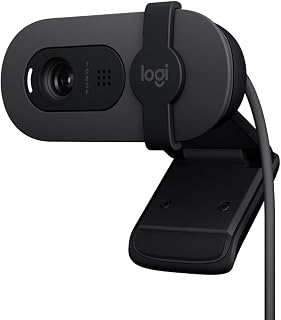
Logitech C920 HD Pro Webcam 1080p
Model: 960-000764
A dependable webcam for clear Full HD calls and recordings from a desk or laptop, with stereo mics and autofocus built in. Mac FaceTime calls drop to standard HD, and the zoom is digital only.
A Logitech Ultra HD webcam with autofocus and automatic exposure for calls and streaming. The listing marks this version as discontinued and unsupported, so check software support for your computer first.
An ultra high definition webcam for calls and streaming with auto focus, built-in mics and a desk-sharing mode. The listing mixes in odd camera specs, so rely on the stated video features.
A compact high resolution webcam for desks and streaming setups, with a bright lens and autofocus. Tracking and voice features appear in the title but not in the specs, so check them first.
A high resolution Logitech webcam for sharp video calls and streams from a desk or home office. The listing gives almost no detail on frame rate, microphones or mounting, so check the full specs before buying.
A face cam with its own adjustable ring light, so streams look lit without a separate lamp. Video stops at full HD and the mounting style is never described.
Logitech MeetUp Conference Camera with Expansion Mic
Model: 960-001201
A room camera, speaker and microphone array in one bar for a small huddle space, with an expansion mic for the far end of the table. Large rooms sit outside its stated design.
A strong option for streamers and remote workers dealing with weak room lighting who want smooth full HD video. HDR and the higher frame rate cannot run together.
A tiny ultra high definition webcam with a large sensor and AI framing for streamers and remote workers who want sharp video with little setup. It can run warm, which the maker says is normal.
A simple plug-in webcam for video calls on Windows, Mac or Chromebook, with a built-in mic so a headset is optional. Image detail stops at HD and the narrow view frames one person, not a group.
A webcam for streamers and video callers who want sharp, smooth video with manual control on a computer. Microphone details are absent from the listing, so plan on a separate mic.
A large-sensor webcam for streamers and creators who shoot in mixed or dim room light from a PC. Full resolution motion is limited, with smooth frame rates reserved for the lower resolutions.
A compact 2K webcam for a laptop or desktop with auto focus and low-light handling. The title's conference speaker wording is not backed up by the specs, so treat it as a camera first.
A streaming webcam that records smooth Full HD and flips to portrait for vertical video. Auto-framing and exposure depend on the Capture software, and there is no privacy shutter listed.
A well-rounded Full HD meeting webcam with light correction, auto-framing, Show Mode and a privacy shutter. Its attached USB-C cable needs an adapter on USB-A-only computers.
A full HD webcam built for streaming and recording, with autofocus, low light correction and stereo mics. Full HD tops out at the standard frame rate, so smoother motion means dropping resolution.
A plain, compact Full HD webcam for everyday calls with a privacy shutter and light balancing. Its narrow view frames one person, and the specs stop at Full HD.
A plug-and-play USB webcam with two microphones, a privacy cover and a tripod mount thread for calls and streaming. Focus is fixed, so it will not follow you if you lean far from the lens.
A fixed-focus 1080p webcam with two microphones, a clip base and a privacy cover for calls and streams. Focus does not adjust, so it works best at normal desk distance.
A tiny gimbal webcam with a large sensor, AI tracking and a three-mic array for streamers, teachers and meeting hosts. It is USB-C only, and voice or gesture control can make the gimbal act up.
A large camera with 4K video that connects to a computer by USB. The listing is thin, carries a seller note that reads camera only, and several spec fields look carried over from a consumer camcorder.
These 10 webcams are the most searched brands and models among the established products in this category (monthly searches for each brand and model); on a tie, the one with more owner ratings ranks first. Product data comes from public Amazon listings (updated 2 days ago). We do not test products ourselves.
Logitech, EMEET, OBSBOT, Microsoft, NexiGo lead this category among the 33 brands that passed our curation checks.
How does ProductDome pick these webcams?
A listing appears only when it has a recorded price, a minimum customer rating, and enough ratings or monthly sales. Generic and unbranded listings are left out, while every real brand stays, including brands sold only on Amazon. The ones that pass are ordered by how many people search for that brand and model each month; review counts only break ties.
About webcams
Webcams come as compact cameras for a laptop or monitor and room cameras intended to frame people around a table. Start by deciding whether you need to show your face, your desk activity or people around a table. For desk demonstrations, establish whether the camera can tilt toward the work while its attachment stays secure.
Judge viewing angle against the camera’s distance from your seat and how much background you want visible. Among the 13 products that list viewing angle, most fall between 63 and 101 degrees, and 82 degrees is typical. A wider view can accommodate people seated beside you, but it can also bring doorways and desk clutter into a personal call. Compare quoted angles on the same basis, since horizontal and diagonal measurements describe different spans. For tighter framing, check whether the camera offers optical zoom or digital cropping; for automatic tracking, check how it follows you and whether you can turn it off. Cropping uses part of the captured image, while tracking may change the composition when another person enters.
For video quality, compare supported video resolution and frame rate together in your intended calling or recording application. The maximum display resolution filter includes labels such as FHD, UHD and FHD Pixels; confirm the supported video modes in the model’s documentation. Still image specifications cannot tell you which video modes are available, and the delivered picture can be limited by the application or network connection. For a dim desk or a window behind your chair, look for documented exposure controls and assess whether you can add light in front of you. If you demonstrate objects close to the lens, compare the documented focusing distance with where you will hold them, and look for a focus lock if unwanted adjustments would interrupt the demonstration.
Before buying, confirm support for your operating system and the connection requirements for your intended video mode, including whether camera controls need separate software. If you plan to use a monitor clip, check that one is included and fits your screen without covering the display; for a separate stand, confirm attachment compatibility and whether the stand or adapter is supplied or sold separately. For calls, establish whether a microphone is built in or a separate audio device is needed, and whether its documented pickup coverage suits your seating arrangement. If physical lens coverage matters, inspect whether a shutter is supplied and whether closing it also mutes the microphone.
How we list products: every listing here has a recorded price, a minimum customer rating and enough ratings or monthly sales. Generic and unbranded listings are left out; every real brand stays, including brands sold only on Amazon. Products are ordered by monthly searches for their brand and model on every page.Editorial policy
Cookie settings
We use necessary cookies to keep the site working. Page views are counted without cookies. With your permission, we also use functional and marketing cookies. Cookie Policy.


 Best Overall